Version: v5.1.0
Date: 2026-05-29
Wisycom Manager
Wisycom Manager v5.1.0 introduces improvements in device communication stability and alarm management.
List of Changes
- Changed the severity level of the EVENTS logs from “Warning” to “Error”
- Reversed the sorting order of the EVENTS logs (most recent events displayed first)
- Removed the MCR54 alarm popup related to Modulation/Compander mismatch
- Fixed an LBC61 “communication closed” alarm
- Fixed an error message occurring while discovering a previously connected COM interface that is no longer available
- Fixed the “power line device busy” error on MRK16 and MATF when LFA/ADFA/BFA antennas were previously connected and are no longer present
- Fixed a configuration issue on MAT244 in 4:2 mode (missing parameters and related errors)
- Fixed an issue in the FREQ. CALC. function when the working range is above 800 MHz
Version: v5.0.0
Date: 2026-04-23
Wisycom Manager
General Improvements
- Introduction of a new graphical control library, with an updated and more consistent layout across most supported devices.
- Improved scene management, including:
- Correct grouping of devices not under live monitoring
- Improved scene association for optical modules
- Enhanced live monitoring views and overall usability.
- Full alignment and merge with Wisycom Manager v4.2.x.
Device Enhancements
MATF
- Major extensions to live monitoring, including:
- Optical channel viewer
- Panel temperature monitoring
- Optical channel power reset via context menu
- Improved antenna scan procedures and alarm management.
- Updated datalist and improved handling of optical inputs.
- Fixes and improvements related to:
- Firmware update procedure
- Bootloader version visualization
- Diagnostic voltage values
- Added support for communication via xFA.
MPR60
- Complete layout and data update to support firmware v1.3.0.
- New Settings options, including:
- Antenna advice enable
- Main view mode selection
- Display of loaded frequency plan information
- Added support for legacy IFB compander loading on channel change.
- Datalist update and general stability improvements.
MTK982
- Fixed frequency step handling when default hardware is selected.
- Updated audio parameter labels when used as an IFB receiver.
- Added support for the 3‑channel IFB receiver.
Other Devices
- MCR42 / MCR54 / MCR54‑DUAL: settings windows updated to the new graphic layout.
- MAT2xx, BFLx2, MRK16, SPL22xx: improved management of active antennas.
- MFL, MFLC, MPA221, BFLx2, LBC61, MTP60, MTP61, MTH610, MTK9x2, MRK980, SPL22xx, MPR50‑IEM: updated graphic layout.
- PFL‑x: preliminary device support (firmware update only).
Firmware Update System
- Fixed device list handling in the firmware update window for units detected but not connected.
- Improved bootloader/application dependency management.
- Increased reliability of the firmware update process.
Frequency Calculation
- Fixed frequency calculation when no scan is loaded and a working range above 800 MHz is selected.
- Improved robustness of frequency assignment in edge conditions.
Stability & Fixes
- Improved Ethernet and communication stability on supported devices.
- Fixed issues related to parameter visualization and live monitoring behavior.
- General bug fixes and performance optimizations.
Notes
Some features (notably MATF and PFL‑x support) were introduced as work in progress and will be further extended and refined in upcoming releases.
Version: v4.2.0
Date: 2026-03-23
Wisycom Manager
General Improvement
• New graphical control library and revised scene tab layout.
• Added grouping by Tab (Scene)
• Added number of devices connected, lost and with active alarms
Device Enhancement
• MTP61XL: added Slim/XL battery selection under INFO
• MCR54/MCR54-DUAL firmware v2.9.0: added management of new parameters (Auto Setup, Channel Name, Frequency selection), added MUTE command. See firmware v2.9.0 release note for more details.
• MRK16: improved ethernet stability.
• MRK16-SCA: fixed issue on scan analyzer measurements (for low levels).
• MPR52-ENG / MPR51-ENG: added the ability to assign a name to presets (12 characters), compatible with firmware v1.9.0 for MPR52-ENG, v1.7.0 for MPR51-ENG.
• MPR60: firmware update only
Communications & Discovery
• More reliable device discovery and connection monitoring.
• Improved handling of devices disappearing from Active area.
• Added Reset command and automatic re-connection when a device is Busy:
• Added Network Diagnostic Tool to check the stability of the network connection: The system allows you to monitor connection loss statistics, execute ping tests, analyze the response timeout of connected devices and change the response timeout. We recommend increasing the response timeout in high network traffic conditions to prevent frequent device disconnections.
Frequency Calculation
• Added Coordination file save/load (file extension. xwff): the file saves all the settings used for the calculation (scan, parameter in the ranges panel, parameters in the settings panel) but not the solutions.
• Fixes frequencies assignment issue with MRK960/MRK950.
• Fixed issue: Tx Ch. Spacing resets to 0kHz when protection level is set to Custom
Show File Management
• Improved show file load in remote-control environments.
Firmware Update System
• Fixes LFA antenna upgrade issue.
• Better management of bootloader/application dependencies: Bootloader update package visible only if flag is enabled
Version: v4.0.0
Date: 2025-04-16
Wisycom Manager
- Added compatibility with BFLT2-BFLR2
- Added compatibility with MTH610
- Added new bootloader for MCR54 and MCR54-DUAL (to allow future upgrade of MCR via MRK16’s Ethernet interface)
- EMBER+ PROVIDER for MAT244, MAT288, MFL, MRK980*, MTK952, MTK952A, MTK982
- Improved CALCULATE FREQ function:
- Added Region, Wisycom TX and Band management
- Added switchable unit of measurement between dBuV and dBm in the SCAN graph
- Added the possibility to update the scan graph with the active scan (reload button)
- Added Device Profile MCR54: to calculate solutions in the 32MHz range for each MCR54
- Added selection Device Type (MIC, IEM) with different protection levels
- Added channel name editing in calculated solutions
- Added automatic solutions deploy to receivers/transmitters connected to the Manager
- Added export solutions in different format (.csv, .xwdf, ,.txt, .cug for WorkBench)
- Added import solutions in different format (.csv, .txt, .cug for WorkBench)
- Improved WDF EDITOR function and added the possibility to save the attendance plan in Excel format
- Improved REMOTE CONTROL function:
- improved stability of Remote Control function
- changed service TCP port from 8000 to 32789
- added remote control management with MRK16 and BFL2
- added show file management in slave PCs
- Improved DISCOVER DEVICES function
- MTK982: added the management of free channel and group (GR:- -, CH: – -)
- RPU500: added the management of 8 customized power levels (editable or updateable via file)
- MRK16: added the compatibility of the SCAN function with MRK16-SCANNER
- Added in the FIRMWARE LIBRARY all the latest firmware
Version: v3.8.2
Date: 2024-05-31
Wisycom Manager
added user parameters on Show File (for MRK16, MCR54 and MTP61)
updated setting page for MTK982 and MTK952A (for compatibility with new firmware MTK982 v2.1.0 and MTK952A v4.0.0
bug fix on remote control feature
Version: v3.7.0
Date: 2024-02-05
Wisycom Manager
Added compatibility with LBC61 (Ethernet connection)
Added support for Channel NAME memory to allow monitor mode with MPR50-IEM (fw v1.7.0)
Version: v3.6.1
Date: 2023-11-02 09:36:21
Wisycom Manager
- Added compatibility with MTP61, LBC61 (only USB connection), MTK982
Version: v3.4.4
Date: 2023-07-06 06:57:24
Wisycom Manager
MTK952:
- fixed a problem loading a show file with MTK952 device
MRK960/MRK950/MCR42/MCR41:
- fixed missing persmission to execute frequency scan.
MPR52-ENG/MPR51-ENG:
- added USER type preset saving.
Version: v3.4.2
Date: 2023-04-26 07:59:38
Wisycom Manager
MTP60:
- Added compatibility with MTP60-JP Japanese version
- Added compatibility with firmware v1.9.0 (added Ladda battery type selection)
MPR50-IFB:
- Added Expansion column management on Channel memory table of MPR50-IFB (compatible starting from MPR50-IFB firmware v1.3.0)
MCR54 and MCR54-DUAL:
- Added compatibility with firmware v2.3.0 (added Audio Route menu and PTT selection)
- Added compatibility with new microcontroller revision mounted on few MCR54s: the Manager recognizes the MCR54 with new microcontroller revision and suggest to upgrade the Bootloader to v1.1.0 providing the related instructions. DO upgrade the bootloader only to the receivers that the Manager suggests.
MTK952:
- Added quick frequency change from the monitoring panel with double click (even if the channel is locked)
Others:
- Improved Expansion column management on Channel memory table:
- added all the expanders available in Wisycom receivers (ENS, ENS-IFB… )
- added ‘-‘ means no change on the expander
- Fixed bug on the firmware library and PC with USA date format (wrong date sorting)
Version: v3.3.0
Date: 2022-06-20 15:17:28
Wisycom Manager
MRK16:
Updated specific alarms.
Added support for scan frequencies and predefined scan ranges.
Added support for EXP3 board.
MRK980:
Updated specific alarms.
MTP60:
Updated specific alarms.
Updated settings layout according to firmware v1.6.0
MCR42:
Added 100ms of delay on compander selection command
MCR42, MPR52-ENG, MPR51-ENG:
Added support for 8/16 bit transmitter battery.
MTP30/MTH300
Fixed device recognition problem.
General devices:
Added minimum suggested bootloader for device
Added signaling if connected device has bootloader version less than minimum suggested.
Monitoring Area bug fix:
When mouse button is clicked over a control previous selections are cleared and new control is selected and contex menu is shown.
Frequencies Calculator:
Added Linear to protection level options.
Added modulation selection.
Version: v3.2.5
Date: 2022-03-29 10:47:57
Wisycom Manager
- Added compatibility with MRK16, MTP60, MCR54-DUAL
- Added Bulk Edit Function on MTK952
This function allow to select multiple MTK952 the same time and perform some actions on all them simultaneously such as switching ON/OFF the RF power, selecting the RF PWR level, M/S configuration and more. To perform this simply select the units from the monitoring windows and then right click on any of the selected ones. - Fixed several minor bugs on the following units:
– MPA221
– MFL
– MFLC
– MRK980
– MAT2xx - Improved remote control function from multiple PCs
NOTE: Remote control function is available for the following devices:
– MAT288
– MAT244
– MFL
– MTK952
– MRK980
– SPL2208
– SPL2216
NOTE: it must be enabled remote control on the Tools > Options > REMOTE CONTROL menu
Please uninstall the previous version of Wisycom Manager you have in your PC before install v3.2.5
Version: v3.1.0
Date: 2020-11-19 16:00:10
Wisycom Manager
Added compatibility with Portable Transmitters:
-MTP40S
-MPT41S
-MTB40S
-MTH400
-MTH410
-MTP51-JP
Added Bridge function on MCR54 to use the MCR54 as a programmer
NOTE: Remember to enable the communication bridge on the MCr54 settings page using the Manager:

This functionality remains enabled on the MCR54 receiver as long as the manager remains active (if the receiver is turned off and on again, the manager re-enables bridge mode automatically; if the manager is closed and reopened, it must be manually re-enabled)
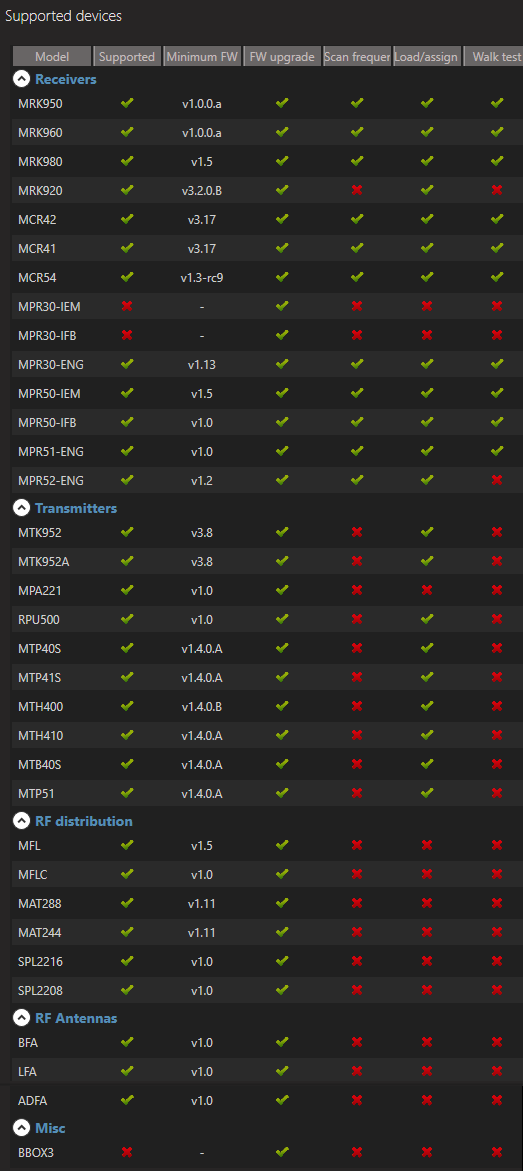
Supported Devices and minimun firmware version
Version: v2.2.1
Date: 2020-07-23 08:31:06
Wisycom Manager
added compatibility with
– MCR54
– RPU500
– BX3 power box for fiber link
– MCR41 (partial)
Version: v2.2.0
Date: 2020-01-14 08:06:10
Wisycom Manager
added remote control of the following devices:
– MAT288
– MAT244
– MFL
– MTK952
– MRK980
– SPL2208
– SPL2216
NOTE: it must be enabled remote control on the Tools > Options > REMOTE CONTROL menu
Version: v2.1.6
Date: 2019-08-09 11:24:43
v2.1.6
- SPL2208/SPL2216:
- fixed problem during the closing of settings page
- ADFA/LFA/BFA:
- added command to read name of the filter
- MPR51/52:
- added possibility to save Channel/Group on the Preset
- Devices with Ethernet interface[MAT288/MAT244]
- added the possibility to modify Ethernet interface settings DHCP/STATIC